

model field of a chat completion request.
This page lists the models, explains the Models tab in the app, and describes how pricing works. For current prices, check the Models tab, because prices update automatically.
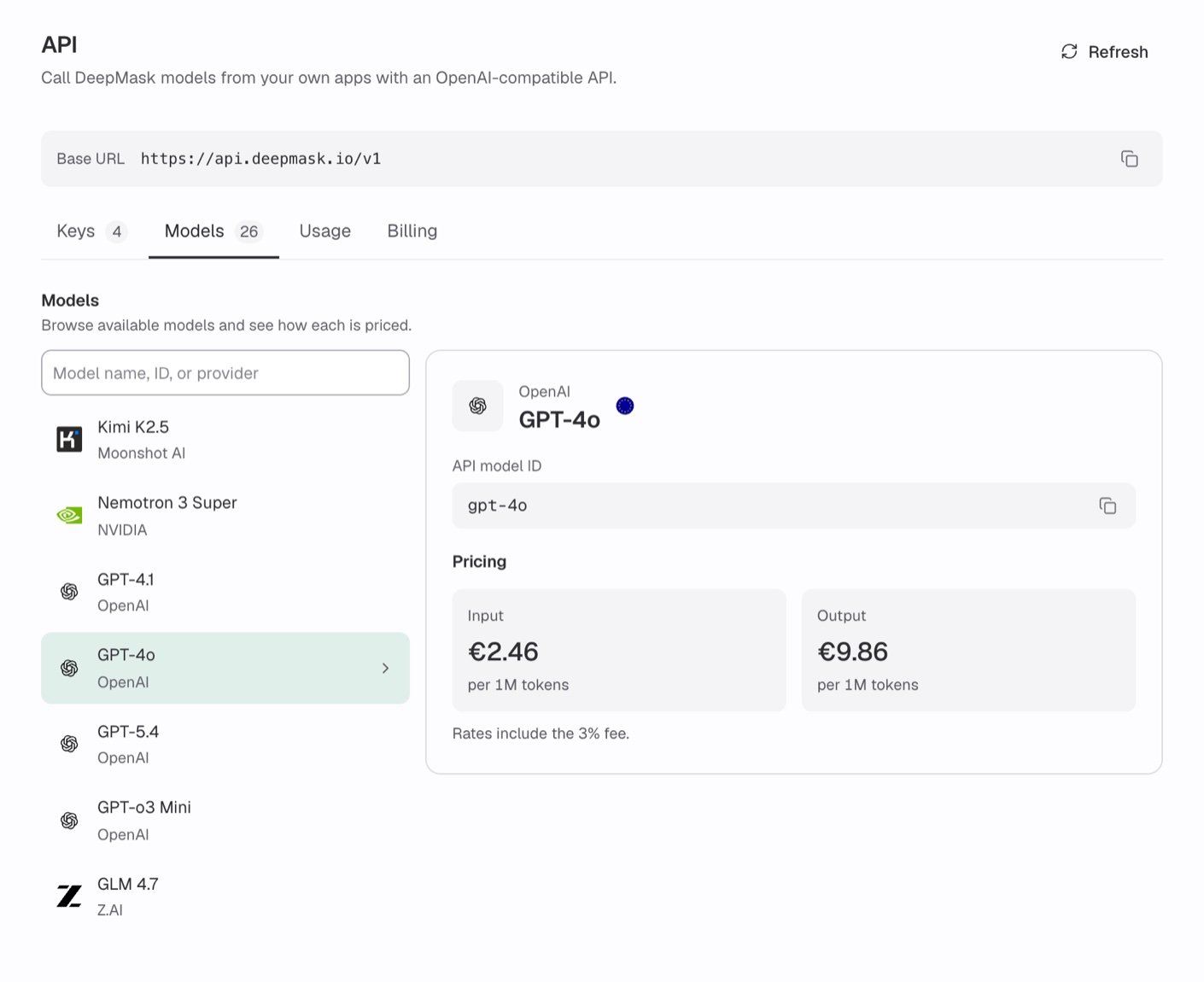
Select a model to see its API model ID and its rates per 1M tokens.
Browsing models in the app
At the bottom of the chat sidebar, click your name and choose User Settings. In the settings sidebar, click API, then select the Models tab. Only organization admins can open the API settings. If you aren’t an admin, use the tables under Available models for model IDs and ask an admin for current rates. See API overview for who can use the API.- Model list: Each entry shows the model name and its maker. Models are sorted by maker, then by name.
- Search: Type a model name, ID, or provider in the search field to filter the list.
- Model details: Select a model to see its maker, its name, and an EU flag. Hover over the flag to see “Hosted in the EU”.
- API model ID: This is the exact value to send as
model. To copy it, click the copy icon next to it (Copy model ID). The message “Model ID copied” confirms it. - Pricing: The Input and Output rates, each per 1M tokens, followed by “Rates include the 3% fee.”
Model details while creating a key
When you create a key with Choose models, each model has an ⓘ button. It opens a short summary with the hosting region, API modes, Context window, Image input, Tool calling, and the same pricing. Image input shows Supported only for models that accept images through the API. Other models show Not supported, even if they accept images in DeepMask Chat. See API keys for the full flow.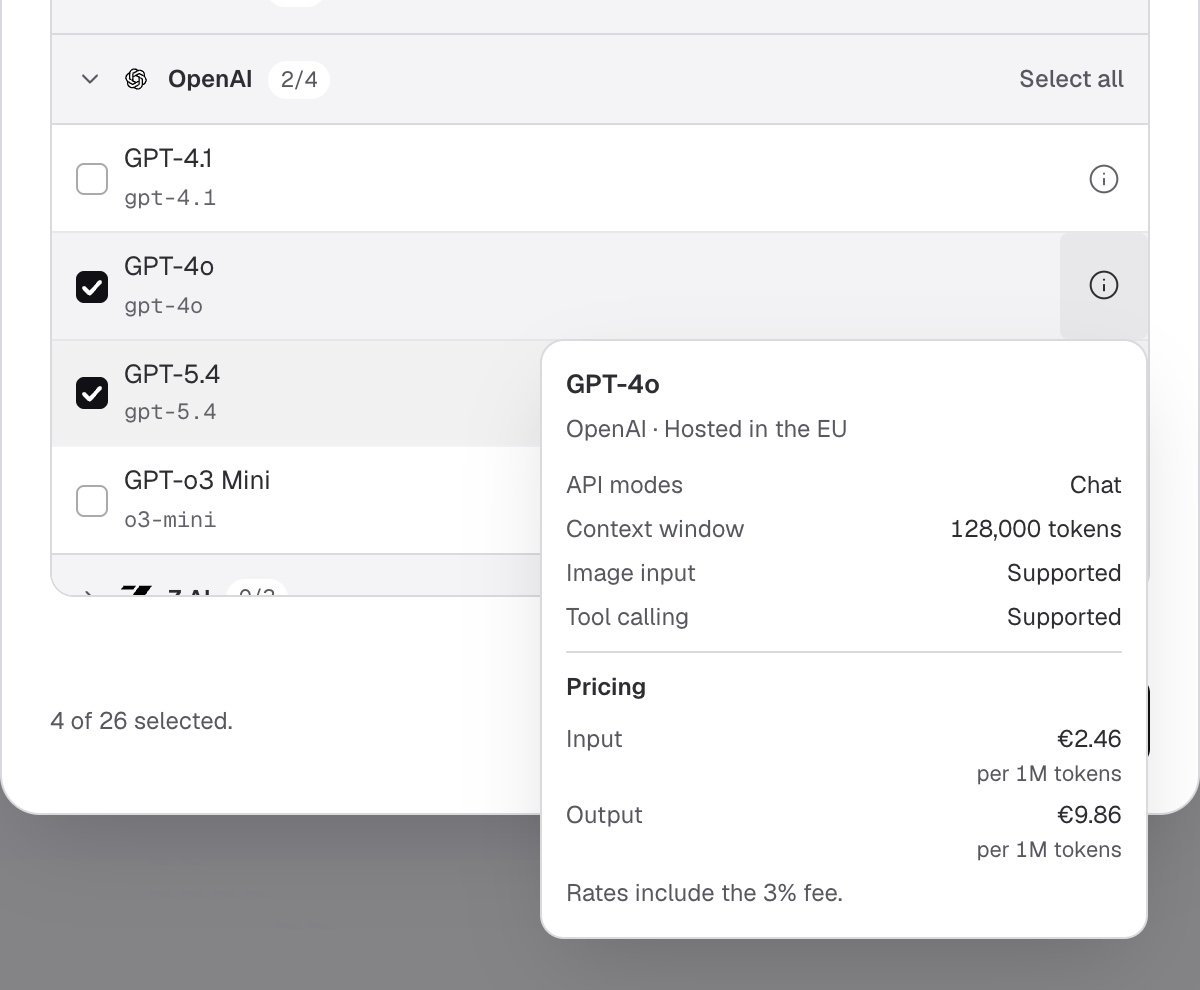
Click a model's ⓘ button to see whether it supports image input and tool calling, and what it costs.
Available models
Use the value in the API model ID column asmodel.
- Context window is the value shown under Context window in a model’s ⓘ details when you create a key. For some models, the provider accepts longer prompts than this value.
- Max output tokens is the largest
max_tokensvalue the API accepts for the model. A larger value is refused with400and the codeAPI_REQUEST_UNBOUNDED.max_completion_tokensworks as an alias with the same limit, but don’t send both. - Image input shows whether the model accepts images in user messages. See Image input.
max_tokens value below the maximum. A provider refusal isn’t billed.
If you omit max_tokens, the model’s default output limit applies. For glm-4.7 and glm-4.7-flash, the default is 65,536 output tokens. To allow longer replies, set max_tokens up to the listed maximum.
For how the context window and max_tokens limits work, see Token limits.
Some models ignore some sampling options, such as top_p or seed, without returning an error. haiku-4.5, sonnet-4.5, opus-4.5, opus-4.6, and sonnet-4.6 accept temperature only from 0 to 1. So do deepseek-v3.2, glm-4.7, glm-4.7-flash, glm-5, kimi-k2.5, minimax-m2.1, minimax-m2.5, nemotron-3-super, and qwen3-235b-2507. The provider refuses a higher value with API_UPSTREAM_REJECTED. That refusal isn’t billed. See Options that some models ignore.
Anthropic
OpenAI
Other makers
deepseek-v3.2 may refuse max_tokens values above 8,000 with API_UPSTREAM_REJECTED. That refusal isn’t billed.The API catalog differs from the models in DeepMask Chat. For Chat models, see AI models.
Image input
Seven models accept images:gpt-4o, gpt-4.1, haiku-4.5, sonnet-4.5, opus-4.5, opus-4.6, and sonnet-4.6. You send each image as a base64 data URL in a user message. Image links are refused and never downloaded. Other models refuse a valid image part with 400 and the code API_IMAGE_INPUT_UNSUPPORTED. Images are billed as input tokens, with no separate price.
To send an image, see the example in Send an image. For the formats and the limits for each model, see Image data and Image limits.
Content arrays that hold only text parts work on every model. For the content rules of each role, see Messages.
Tool calling
Every model supports function tool calling. The allowedtool_choice values and support for parallel_tool_calls differ by model. See Model-specific tool restrictions before you set either field.
Listing models with the API
GET /v1/models returns the models that the calling key may use. It doesn’t return the full catalog. The list is sorted by model ID. It doesn’t show which models accept images, so use the tables under Available models for that.
cURL
- A request for a model the key can’t use returns
403with the codeAPI_MODEL_NOT_ALLOWED. - A model removed from the catalog disappears from the list, even if the key was granted it.
New models and existing keys
New models aren’t added to existing keys. This also applies to keys created with All current models, which notes “Excludes future models.” You can’t change a key’s models after you create it. To use a new model, create a new key that includes it. See API keys.How pricing works
You pay for the tokens each request uses, at the model’s rates. Rates are in euros per 1M tokens. The Models tab shows each model’s current Input and Output rates.- The fee is included: Rates on the Models tab already include the 3% fee. The fee isn’t added again on top. VAT isn’t included. Your invoice adds it where applicable. See What you pay.
- Rounding: The app rounds rates for display. Billing uses the exact rates.
- Prices change: DeepMask updates API prices automatically. Each request is billed at the rate that applied when it ran. If you’ve had the page open for a while, click Refresh to see the latest rates.
- Spending caps: Caps measure model costs before the fee and tax. See Spending caps.
- Content filter answers are billed:
opus-4.7,opus-4.8,opus-5,opus-5.5,sonnet-5,sonnet-5.5, andhaiku-5.5can decline a request through the provider’s safety classifiers. The response hasfinish_reason: "content_filter"and is billed like any other response.
Long-prompt pricing
Two models charge higher rates for long prompts. Once a prompt is over the threshold, the whole request is billed at the higher rates.
For
gpt-5.4, the Context window in the app (272,000 tokens) is the limit for standard rates. Longer prompts are accepted and billed at the long-prompt rates.
For these models, the Models tab shows Input and Output as a range. The lower value is the standard rate and the higher value is the long-prompt rate.
Cached input
The OpenAI models (gpt-4.1, gpt-4o, gpt-5.4, and o3-mini) cache prompts of 1,024 tokens or more automatically. Prompt tokens served from the cache are billed at a lower cached-input rate instead of the Input rate. On gpt-4o and gpt-4.1, images you send again, for example in the conversation history, can also be served from the cache. You don’t need to change your requests.
The Anthropic models, mistral-large-3, and the models from Alibaba, DeepSeek, MiniMax, Moonshot AI, NVIDIA, and Z.AI don’t bill cached input. Every prompt token is billed at the Input rate.
Anthropic prompt caching isn’t available through the API. A cache_control field on a text part is refused with 400 and the code API_REQUEST_UNBOUNDED. On an image part, it’s refused with 400 and the code API_IMAGE_INVALID. So you can’t mark content for caching.
Reasoning and thinking tokens
If a model reasons before it answers, its hidden reasoning tokens count towardmax_tokens and are billed as output tokens. This includes reasoning models such as o3-mini and the Claude models that always think: opus-5, opus-5.5, sonnet-5, sonnet-5.5, and haiku-5.5. You can’t turn thinking off for these Claude models.
Next steps
Chat completions
Send requests to a model, including streaming and tools.
API keys
Create keys and choose which models each key can use.
Limits and fair use
See the rate, token, and budget limits that apply to your requests.
Billing
Enable API billing and read your monthly invoices.